
Check-Ins ratios
Know when a room needs another adult, during the service.
A ratio set on a Check-Ins location limits who can check in at the door. It doesn't tell anyone that a room's adults are now outnumbered. Arkrooms watches the counts during services and tells your leaders, and plans next month's staffing from the Sundays you've had.
During the service
Leaders hear about a short room while there's time to fix it.
- Kids next to adults
- Each room's checked-in kids next to the adults scheduled in it, on the leaders' Sunday page.
- An alert when a room is short
- Leaders and admins get an email and a banner at the top of the app when a room has more kids than its adults cover.
- A warning before it's full
- Optional: hear when a room has room for only one or two more kids, before it's over.
- Your ratios, per age group
- Kids per adult for each age group, the same ratios the schedule is staffed for.
Before the season
Staff for the kids you'll actually have.
- What to plan for
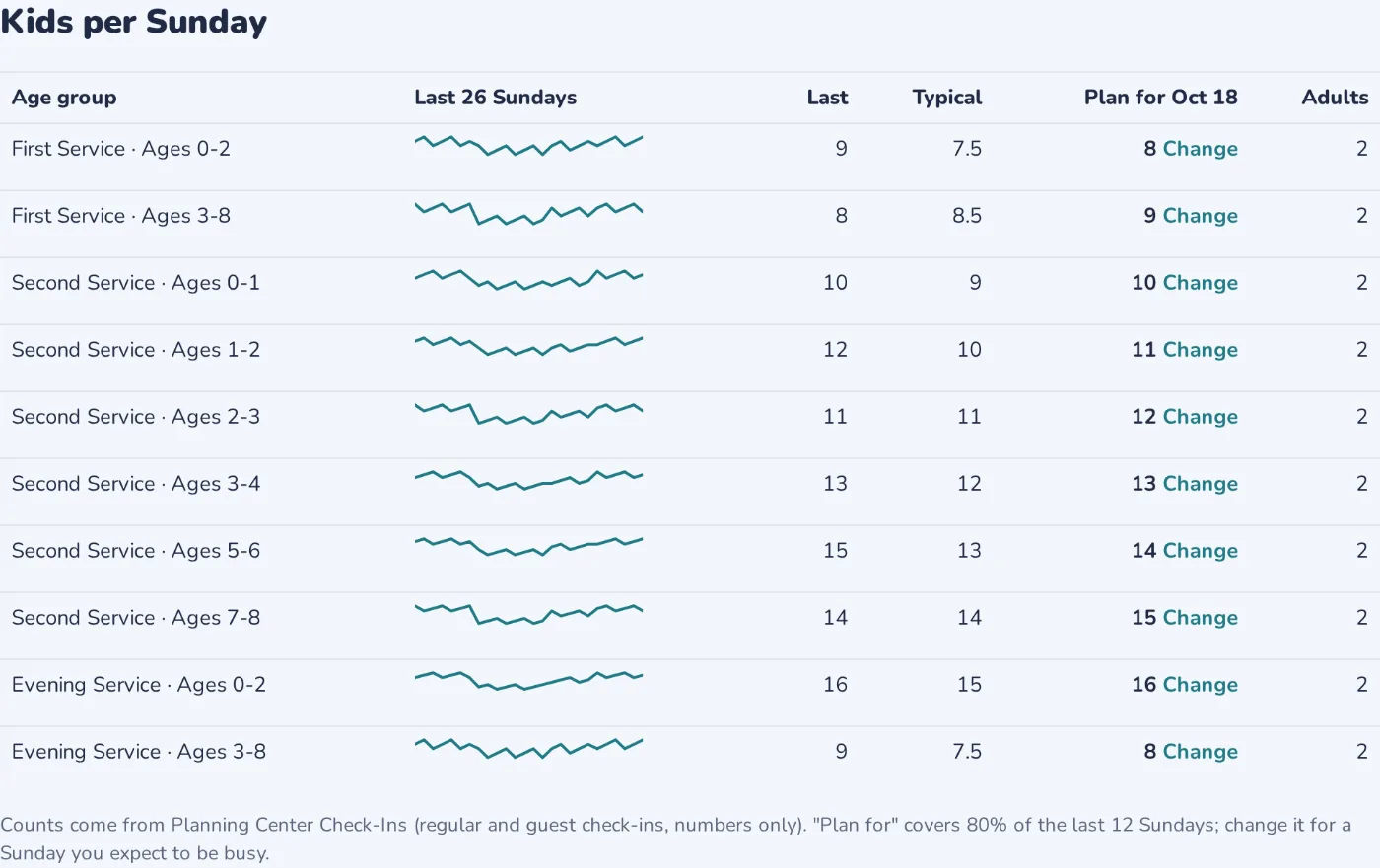
- Each age group's last 26 Sundays, its typical number and a number to staff for, which you can raise for Easter or VBS.
- Rooms staffed to match
- The schedule is filled for the kids you expect, at each age group's ratio.
- Numbers only
- Check-Ins is read as head counts per room. Nothing about the children is kept.
Questions
What does it read from Check-Ins?
Head counts per room, read-only. No names or details about children are kept or emailed.
What's needed to turn it on?
Your Check-Ins locations matched to your rooms on the Rooms page, and the room alerts turned on in Settings.
How is this different from the ratio on a Check-Ins location?
That ratio is a limit at the door on the day. These alerts tell leaders when the adults in a room are outnumbered, and the forecast helps you schedule enough adults in the first place. Check-Ins ratios, explained.
What ratios should we use?
Your policy, insurer or state may set them. The free ratio table is a place to start.